



Mastering Java FileWriter: A Complete Tutorial
Mastering Java FileWriter: A Complete Tutorial
Discover how to use Java’s FileWriter to write character data to files, with clear examples, encoding options, and key methods.
The FileWriter class in the java.io package is a straightforward tool for writing text to files. It extends OutputStreamWriter and defaults to the platform’s character encoding unless you explicitly set one.
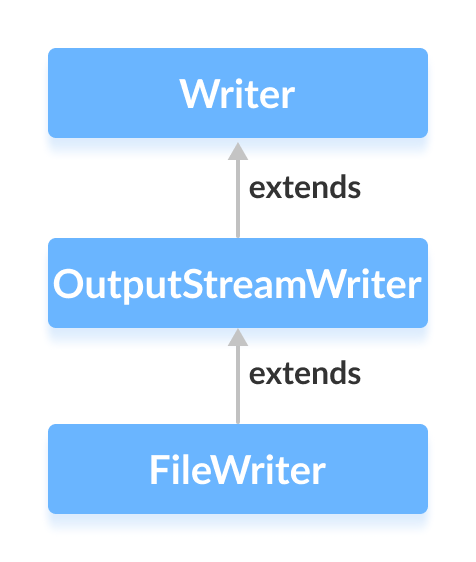
Before diving deeper, ensure you understand basic Java file handling.
Creating a FileWriter
To instantiate a FileWriter, first import the class:
import java.io.FileWriter;
There are several ways to create a FileWriter:
- By file name
FileWriter output = new FileWriter("output.txt"); - By
FileobjectFile file = new File("output.txt"); FileWriter output = new FileWriter(file); - With explicit charset (Java 11+)
FileWriter output = new FileWriter("output.txt", StandardCharsets.UTF_8);
Specifying a charset ensures consistent behavior across platforms.
Key Methods of FileWriter
write()
write(int c)– writes a single character.write(char[] cbuf)– writes an array of characters.write(String str)– writes a string.
Example: Writing Text to a File
import java.io.FileWriter;

public class Main {
    public static void main(String[] args) {
        String data = "This is the data in the output file";
        try (FileWriter writer = new FileWriter("output.txt")) {
            writer.write(data);
        } catch (Exception e) {
            e.printStackTrace();
        }
    }
}
Running this program creates output.txt containing:
This is the data in the output file
getEncoding()
The getEncoding() method reveals the character set used by the writer:
import java.io.FileWriter;
import java.nio.charset.StandardCharsets;

public class Main {
    public static void main(String[] args) {
        try {
            FileWriter defaultWriter = new FileWriter("output.txt");
            FileWriter utf8Writer = new FileWriter("output.txt", StandardCharsets.UTF_8);
            System.out.println("Default encoding: " + defaultWriter.getEncoding());
            System.out.println("UTF‑8 encoding: " + utf8Writer.getEncoding());
            defaultWriter.close();
            utf8Writer.close();
        } catch (Exception e) {
            e.printStackTrace();
        }
    }
}
Output:
Default encoding: Cp1252
UTF‑8 encoding: UTF-8
Use Charset.forName() or StandardCharsets for reliable encoding names.
Tip: Refer to the official Java FileWriter documentation for deeper details.
close()
Always close a FileWriter (or use a try‑with‑resources block) to flush buffers and release system resources. After closing, the writer cannot be reused.
Other Useful Methods
| Method | Description |
|---|---|
flush() | Immediately writes any buffered data to the underlying stream. |
append() | Conveniently adds characters or strings to the writer. |
For a full list of methods, consult the official Java FileWriter API.
Java
- Mastering Java Anonymous Inner Classes: Definition, Syntax, and Practical Examples
- Mastering Java FileInputStream: A Practical Guide with Code Examples
- Mastering Java’s ObjectInputStream: A Comprehensive Guide
- Mastering Java ObjectOutputStream: Serialization, Methods, and Practical Examples
- Mastering Java BufferedInputStream: Efficient Byte Reading & Advanced Methods
- Mastering Java’s PrintStream Class: Print, Println, and Printf Explained
- Mastering Java FileReader: Comprehensive Guide & Practical Examples
- Mastering Java BufferedReader: Efficient Character Stream Handling
- Java BufferedWriter: Efficient Character I/O Explained
- Mastering Java File Operations with java.io – Creation, Reading, Writing & Deletion