



Python 2 vs Python 3: Key Differences and Choosing the Right Version
What is Python 2?
Python 2 streamlined development by addressing technical details outlined in Python Enhancement Proposals (PEPs). The final release, Python 2.7, entered its end‑of‑life in 2020 and is no longer supported by the Python Software Foundation. Though it remains in use in legacy systems, its future is uncertain.
- Legacy support for existing codebases
- Compatibility with older libraries and tooling (e.g., Puppet, Ansible)
- Organizations that cannot yet migrate to Python 3
What is Python 3?
Released in December 2008, Python 3 was designed to resolve long‑standing issues in Python 2 and to modernize the language. It introduced features such as true division, a new print() function, and built‑in Unicode support. However, these changes render Python 3 backward‑incompatible with Python 2, necessitating code migration for many projects.
Key Differences Between Python 2 and Python 3
- Syntax: Python 3’s
print()and string handling are cleaner and more intuitive. - Unicode: Strings default to Unicode in Python 3; Python 2 requires a leading
u. - Variable Scope: Global variables remain unchanged in loops in Python 3, unlike Python 2.
- Exception Syntax: Python 3 requires parentheses (e.g.,
except Exception as e). - Ordering Comparisons: Simplified rules in Python 3; Python 2 had complex, type‑based ordering.
- Iteration:
range()replacesxrange()in Python 3 for memory‑efficient loops.
Why You Might Still Need Python 2
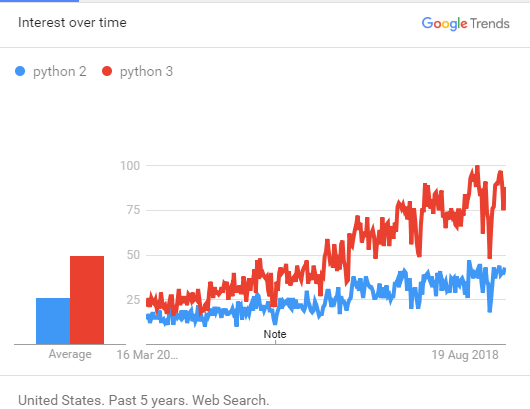
- Existing infrastructure built on Python 2 (e.g., legacy web apps, system scripts)
- Projects dependent on third‑party libraries that haven’t been ported to Python 3
- Roles that require proficiency in both versions for DevOps tooling
Why You Should Adopt Python 3
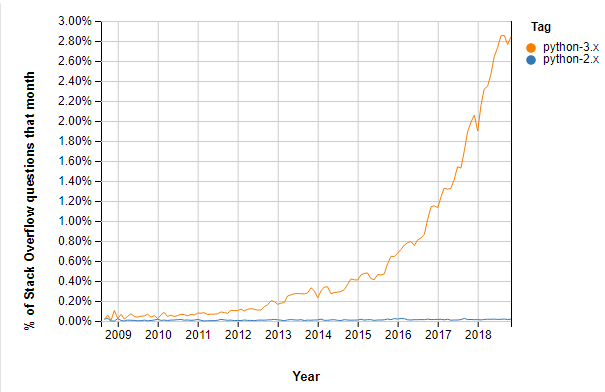
- Support for modern domains such as AI, machine learning, and data science
- Active community and extensive ecosystem of libraries (e.g., pandas, NumPy, TensorFlow)
- Improved readability and maintainability of code
- Better integration with other languages and platforms
Release History
Python 2 Timeline
- 2.0 – Oct 16, 2000
- 2.1 – Apr 17, 2001
- 2.2 – Dec 21, 2001
- 2.3 – Jul 29, 2003
- 2.4 – Nov 30, 2004
- 2.5 – Sep 19, 2006
- 2.6 – Oct 1, 2008
- 2.7 – Jul 3, 2010
Python 3 Timeline
- 3.0 – Dec 3, 2008
- 3.1 – Jun 27, 2009
- 3.2 – Feb 20, 2011
- 3.3 – Sep 29, 2012
- 3.4 – Mar 16, 2014
- 3.5 – Sep 13, 2015
- 3.6 – Oct 2016
- 3.7 – Jun 2018
Side‑by‑Side Code Example
Python 3
def main():
    print("Hello World!")

if __name__ == "__main__":
    main()
Python 2
def main():
    print "Hello World!"

if __name__ == "__main__":
    main()
Which Version Should You Use?
Python 3 has become the industry standard, with continued support and a growing ecosystem. Since Python 2 reached end‑of‑life in 2020, new projects should adopt Python 3. If your job or existing codebase demands Python 2, that remains a valid but diminishing use case.
Takeaway
- Python 2 streamlined earlier development but is now obsolete.
- Python 3 introduced modern language features and is backward‑incompatible.
- For new development, choose Python 3 to benefit from community support, performance, and library availability.
Python
- Cloud vs. Virtualization: Key Differences & Business Impact
- Sensors vs. Transducers: Clear Differences & Practical Applications
- FRP vs Fiberglass: Understanding the Key Differences and Industrial Benefits
- Bolts vs. Screws: How to Choose the Right Fastener for Your Project
- Understanding the Difference Between Tube Steel (TS) and Hollow Structural Steel (HSS)
- Python vs PHP: Key Differences, Strengths, and Choosing the Right Language
- Python vs. Go: Which Language Wins for Your Project?
- Python vs JavaScript: Key Differences, Features, and When to Choose Each
- Python vs Ruby: A Comprehensive Comparison of Features, Advantages, and Use Cases
- Python vs. C++: Key Differences & Which Is Right for You