



Master XML Parsing in Python: A Practical Guide Using Minidom and ElementTree
What is XML?
XML, or eXtensible Markup Language, was created to store and transport structured data efficiently. It’s widely used for exchanging information between systems and applications.
Python provides robust libraries for parsing and manipulating XML documents. However, to parse an XML file, the entire document must first be loaded into memory. In this tutorial we’ll demonstrate how to use Python’s xml.dom.minidom and xml.etree.ElementTree modules to read, inspect, and modify XML files.
By the end of this guide you’ll be able to:
- Parse XML with
minidom - Create new XML nodes
- Parse XML with
ElementTree
Parsing XML with minidom
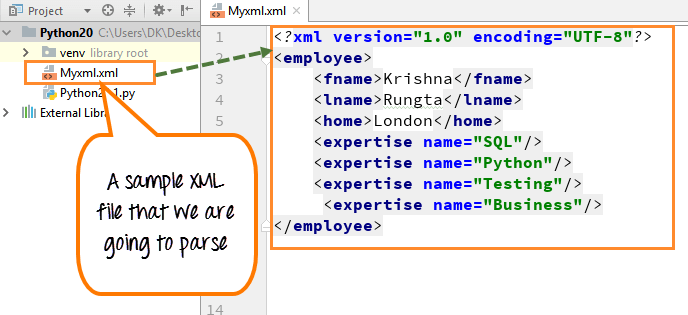
We’ll start with a sample XML file that contains employee data. The file looks like this:
Step 1) The file lists an employee’s first name, last name, home, and expertise areas such as SQL, Python, Testing, and Business.
Step 2) After loading the document, we’ll print the nodeName of the root element and the tagName of its first child. These are standard properties of a DOM object.
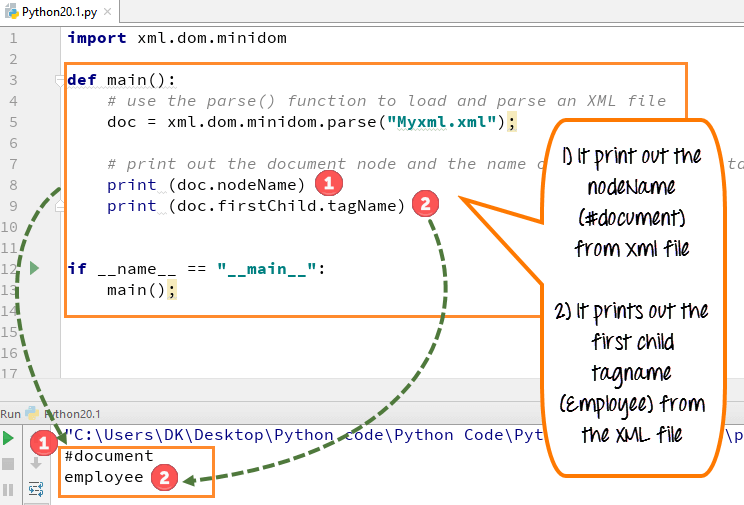
- Import
xml.dom.minidomand load the XML file (myxml.xml). - Parse the file with
parse()to obtain a document object. - Retrieve and display the document’s
nodeNameand the first child’stagName. - Use
getElementsByTagName()to list allexpertiseelements and print each skill.
Note: The nodeName and tagName values follow XML DOM naming conventions, which may be unfamiliar if you’re new to XML.
Step 3) We can extract a list of all skills from the document. The following code demonstrates how to gather the skill names into a set.
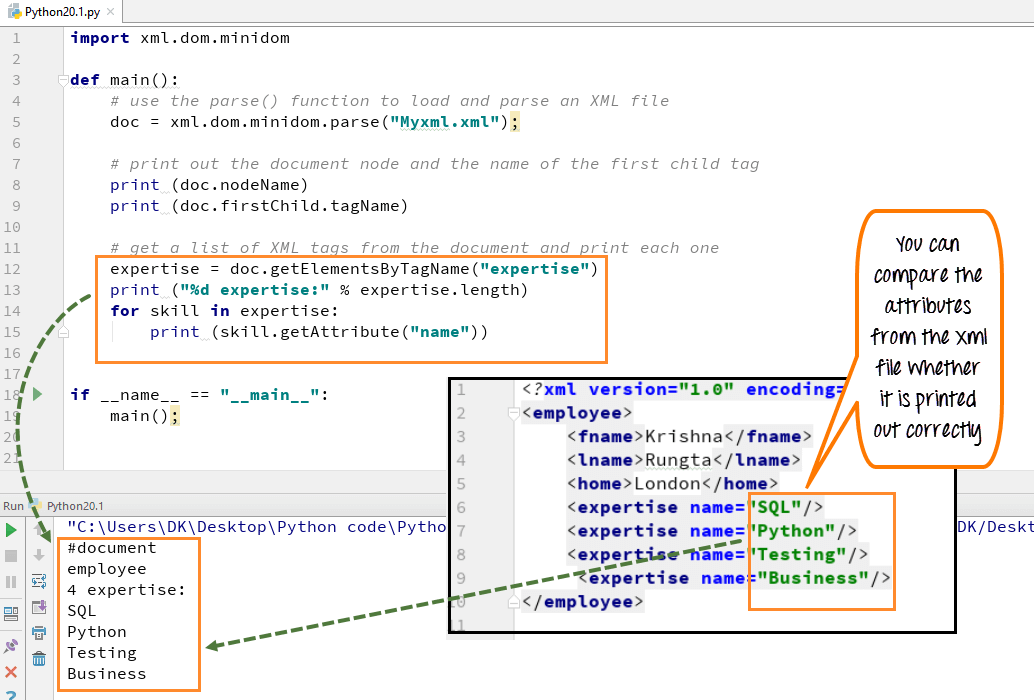
- Use
getElementsByTagName("skill")to retrieve all skill elements. - Iterate over the returned list and output each skill’s
nameattribute.
Creating a New XML Node
Adding new data to an existing XML structure is straightforward with minidom. In our example, we’ll add a new expertise node labeled “BigData”.
- Create the new element with
createElement("expertise")and set itsnameattribute. - Append the new element to the document’s root child.
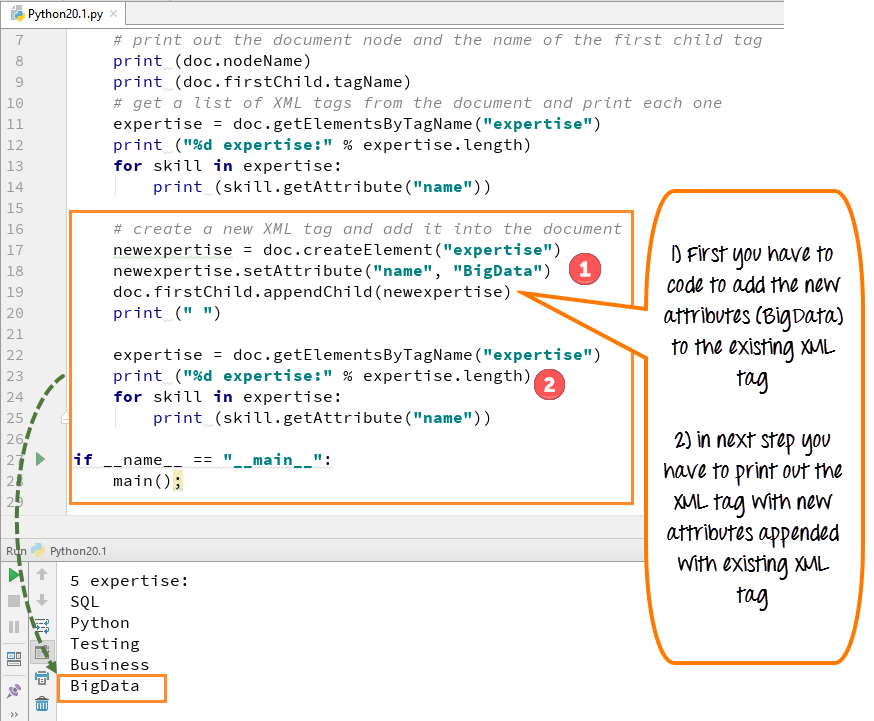
- After insertion, the
expertiselist now includes the new “BigData” skill.
XML Parser Example
Python 2 Example
import xml.dom.minidom

def main():
    # Load and parse the XML file
    doc = xml.dom.minidom.parse("Myxml.xml")

    # Output root information
    print doc.nodeName
    print doc.firstChild.tagName

    # List existing expertise entries
    expertise = doc.getElementsByTagName("expertise")
    print "%d expertise:" % expertise.length
    for skill in expertise:
        print skill.getAttribute("name")

    # Add a new expertise entry
    newexpertise = doc.createElement("expertise")
    newexpertise.setAttribute("name", "BigData")
    doc.firstChild.appendChild(newexpertise)
    print " "

    # Verify addition
    expertise = doc.getElementsByTagName("expertise")
    print "%d expertise:" % expertise.length
    for skill in expertise:
        print skill.getAttribute("name")

if __name__ == "__main__":
    main()
Python 3 Example
import xml.dom.minidom

def main():
    # Load and parse the XML file
    doc = xml.dom.minidom.parse("Myxml.xml")

    # Output root information
    print(doc.nodeName)
    print(doc.firstChild.tagName)

    # List existing expertise entries
    expertise = doc.getElementsByTagName("expertise")
    print("%d expertise:" % expertise.length)
    for skill in expertise:
        print(skill.getAttribute("name"))

    # Add a new expertise entry
    newexpertise = doc.createElement("expertise")
    newexpertise.setAttribute("name", "BigData")
    doc.firstChild.appendChild(newexpertise)
    print(" ")

    # Verify addition
    expertise = doc.getElementsByTagName("expertise")
    print("%d expertise:" % expertise.length)
    for skill in expertise:
        print(skill.getAttribute("name"))

if __name__ == "__main__":
    main()
Parsing XML with ElementTree
ElementTree is a lightweight API that makes XML manipulation simple and Pythonic. It’s ideal for reading large XML files without the overhead of a full DOM.
Our sample XML data:
<data>
   <items>
      <item name="expertise1">SQL</item>
      <item name="expertise2">Python</item>
   </items>
</data>
Reading XML with ElementTree:
First, import the module:
import xml.etree.ElementTree as ET
Parse the file and obtain the root element:
tree = ET.parse('items.xml')
root = tree.getroot()
Here’s the complete code to display all skill names:
import xml.etree.ElementTree as ET

tree = ET.parse('items.xml')
root = tree.getroot()

print('Expertise Data:')
for elem in root:
    for subelem in elem:
        print(subelem.text)
Output:
Expertise Data:
SQL
Python
Summary
Python’s xml.dom.minidom and xml.etree.ElementTree modules empower developers to load, analyze, and modify XML documents efficiently. While minidom provides a full DOM representation suitable for complex manipulations, ElementTree offers a lightweight alternative for straightforward parsing and extraction.
- Load XML with
parse()(e.g.,doc = xml.dom.minidom.parse(file)). - Use
getElementsByTagName()to retrieve elements. - Create and append new nodes with
createElement()andappendChild(). - With ElementTree, simply iterate over child elements to access data.
Python
- Python File I/O: Mastering File Operations, Reading, Writing, and Management
- Mastering C# File Streams: StreamReader & StreamWriter – Step‑by‑Step Guide
- Reading Files in Java with BufferedReader – A Practical Guide with Examples
- Mastering Python’s Yield: Generator vs Return – A Practical Guide
- Master Python File Handling: Create, Read, Write, and Open Text Files with Ease
- Creating ZIP Archives in Python: From Full Directory to Custom File Selection
- How to Read and Write CSV Files in Python: A Comprehensive Guide
- Python JSON: Encoding, Decoding, and File Handling – A Practical Guide
- Master Python Unit Testing with PyUnit: A Practical Guide & Example
- Python Calendar Module: Expert Guide with Code Examples