Industrial manufacturing
Industrial Internet of Things | Industrial materials | Equipment Maintenance and Repair | Industrial programming |
home  MfgRobots >> Industrial manufacturing >  >> Manufacturing Technology >> Manufacturing process

DIY Autoranging Capacitance Meter (10 pF–10 µF) – Easy Arduino Build

Components and supplies

DIY Autoranging Capacitance Meter (10 pF–10 µF) – Easy Arduino Build
Arduino Nano R3
×1
DIY Autoranging Capacitance Meter (10 pF–10 µF) – Easy Arduino Build
Resistor 10k ohm
×1
DIY Autoranging Capacitance Meter (10 pF–10 µF) – Easy Arduino Build
Resistor 1k ohm
×1
DIY Autoranging Capacitance Meter (10 pF–10 µF) – Easy Arduino Build
Resistor 1M ohm
×1
DIY Autoranging Capacitance Meter (10 pF–10 µF) – Easy Arduino Build
Alphanumeric LCD, 16 x 2
×1
DIY Autoranging Capacitance Meter (10 pF–10 µF) – Easy Arduino Build
Single Turn Potentiometer- 10k ohms
×1

Necessary tools and machines

DIY Autoranging Capacitance Meter (10 pF–10 µF) – Easy Arduino Build
Soldering iron (generic)

Apps and online services

DIY Autoranging Capacitance Meter (10 pF–10 µF) – Easy Arduino Build
Arduino IDE

About this project

Simple Digital Multimeters (DMMs) cannot measure the capacitance and in order to find the capacitance, you either need to go for an advanced, expensive DMM or find a dedicated Capacitance modules.

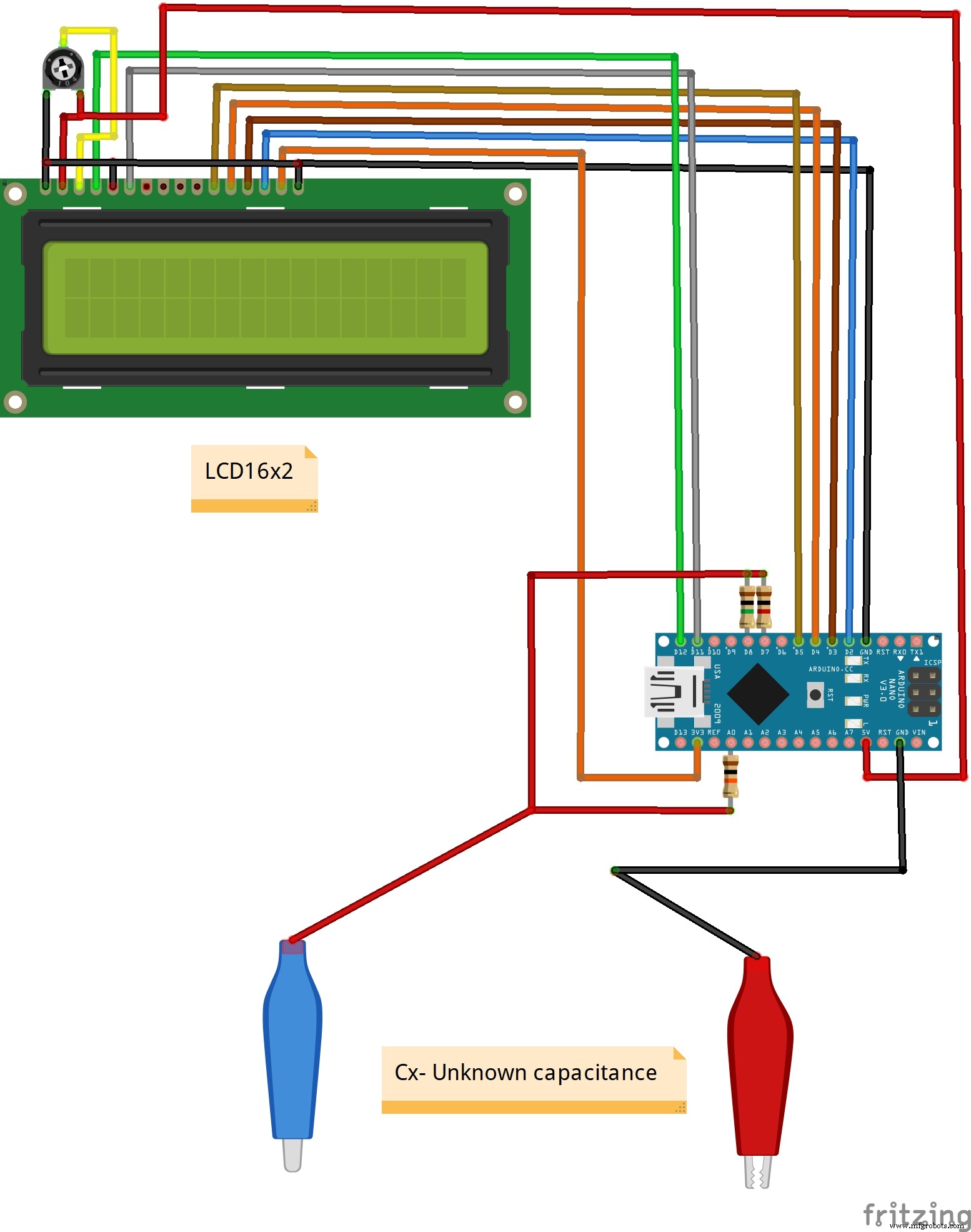
In this project, I will build a simple Arduino Capacitance Meter with Auto-Ranging feature. It can measure capacitance from 10 pF to 10, 000 μF. The measurement takes place in automatic mode, it is enough to connect the capacitor to the measuring contacts. The device has two ranges: "nF" and "μF". When measuring a capacitor, the "nF" range is first switched on, if the capacitance is too large, then the transition to the "μF" range occurs.

Each capacitance meter has an RC circuit with known resistor values and an unknown capacitor value. The Arduino will measure the voltage at the capacitor and record the time it takes to reach a certain percentage of it’s voltage when fully charged (the time constant). Since the resistance value is already known, we can use the formula in a program that will calculate the unknown capacitance. The capacitor under test is charged using one of the resistors. The Arduino initiates the charging of the capacitor through resistor according to its capacity. In the capacitance meter, a zero calibration is performed every time it is turned on, therefore, at the moment of switching on, a capacitor should not be connected to the measuring contacts. Also, all capacitors must be pre-discharged.

DIY Autoranging Capacitance Meter (10 pF–10 µF) – Easy Arduino Build

The accuracy is +/- a few percent and depends primarily on the tolerance of the resistors used as well as the stability of the supply voltage.

Lastly, the entire device is housed in a suitable box and is another useful tool in your lab.

Code

  • Arduino code
Arduino codeC/C++
#include <LiquidCrystal.h>
LiquidCrystal lcd(12, 11, 5, 4, 3, 2);// RS,E,D4,D5,D6,D7
void setup(){
  lcd.begin(16, 2);// LCD 16X2
  pinMode(A0,INPUT);
}
unsigned long time0,time1,time2; 
float c,null0;
byte kn,mk,i;

void loop(){ 
  lcd.setCursor(15,0); 
  lcd.print("*");
  if(mk==0){
    pinMode(8,OUTPUT);
    pinMode(7,INPUT);
    digitalWrite(8,HIGH);
  }

  if(mk==1){
    pinMode(7,OUTPUT);
    pinMode(8,INPUT);
    digitalWrite(7,HIGH);
  }

  time0=micros();
  while(analogRead(A0)<644){
    time2=micros()-time0;
    if(time2>=1000000 && mk==0){
      mk=1;
      time0=100000000;
      break;
    }
  }

  time1=micros()-time0; 

  while(analogRead(A0)>0){ 
    pinMode(7,OUTPUT); 
    pinMode(8,OUTPUT); 
    digitalWrite(7,LOW); 
    digitalWrite(8,LOW);
  }

  if(mk==1&&time1<1000){
    mk=0;
  }

  lcd.setCursor(1,0);
  c=time1;
  c=c/1000-null0;
  c=abs(c);

  if(time1>=10000000){
    lcd.setCursor(1,0);
    lcd.print(" TEST uF   "); 
  }
  else{
    lcd.print(c); 

    if(mk==0){
      lcd.print(" nF       ");
    }
    if(mk==1){
      lcd.print(" uF       ");
    }
  }
  if(i==0){
    i++;
    null0=c+0.02;
  }
  delay(100);
}

Schematics

DIY Autoranging Capacitance Meter (10 pF–10 µF) – Easy Arduino Build

Manufacturing process

  1. Build a 20 kHz Arduino Oscilloscope on a Nokia 5110 LCD – Easy DIY Guide
  2. Build an Italian Word Clock with Arduino Nano, NeoPixel, LCD, and RTC
  3. Build a Reliable Sigfox kWh Meter with Arduino MKR Fox 1200
  4. DIY Frequency Meter – Measure Up to 6.5 MHz with Arduino Nano
  5. Bluetooth-Enabled Temperature Monitor with Arduino Nano
  6. Touch‑Free Gesture Lock: Secure Access with APDS‑9960 and Arduino
  7. Arduino Nano Companion Kit – Essential Components & Tools for DIY Electronics
  8. USB MIDI Adapter Kit for Arduino Micro / Leonardo – Complete Parts List
  9. DIY Automated Electronic Component Tester – Simple, Accurate, and Reliable
  10. Build a Reliable DIY Plant Moisture Sensor with Arduino UNO