



Creating an Array of Objects in Java: A Step‑by‑Step Guide
What Is an Array of Objects?
An array of objects in Java is a collection that holds references to instances of a class, rather than primitive values like int or String. Each element of the array stores a reference (a memory address) to an object created elsewhere.
Syntax:
ClassName[] arrayName = new ClassName[arrayLength];
Step‑by‑Step Example
Below is a minimal, working example that demonstrates how to declare, instantiate, and use an array of Account objects.
class ObjectArray {
    public static void main(String[] args) {
        // Declare an array that can hold two Account references
        Account[] accounts = new Account[2];

        // Create Account objects and assign them to array slots
        accounts[0] = new Account();
        accounts[1] = new Account();

        // Populate the accounts with data
        accounts[0].setData(1, 2);
        accounts[1].setData(3, 4);

        // Display the data stored in each Account
        System.out.println("For Array Element 0");
        accounts[0].showData();
        System.out.println("For Array Element 1");
        accounts[1].showData();
    }
}

class Account {
    private int a;
    private int b;

    public void setData(int c, int d) {
        a = c;
        b = d;
    }

    public void showData() {
        System.out.println("Value of a = " + a);
        System.out.println("Value of b = " + b);
    }
}
Run the code and you should see the following output:
For Array Element 0
Value of a = 1
Value of b = 2
For Array Element 1
Value of a = 3
Value of b = 4
Common Pitfalls
1. NullPointerException: Forgetting to instantiate each array element (e.g., accounts[0] = new Account();) results in a NullPointerException when you try to access setData or showData.
2. IndexOutOfBoundsException: The array length is fixed at creation time. Trying to assign a value beyond the declared length throws this exception.
Visualizing the Array
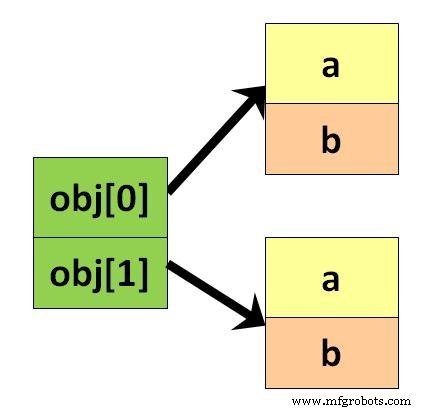
The following diagram shows the memory layout of a two‑element array of Account references.
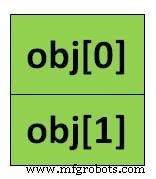
After creating the objects, the diagram becomes:
For more detailed concepts, refer to the Java Object Class Tutorial.
Java
- Mastering Java Arrays: Declaration, Initialization, and Manipulation
- Mastering Java Multidimensional Arrays: 2D & 3D Examples
- Java Array Copying Techniques: A Comprehensive Guide
- Java Classes and Objects: A Practical Guide
- Java ByteArrayInputStream: A Practical Guide to Reading Byte Arrays
- Java Arrays Tutorial: Declaration, Creation, and Initialization – Example Code
- Mastering Java Packages: Creation, Importing, and Best Practices
- Creating Custom Exceptions in Java: A Step‑by‑Step Guide
- Java Swing Tutorial: Building Robust GUI Applications
- Master Java Arrays: A Comprehensive Guide to Efficient Data Handling