



VHDL Variables Explained: Practical Examples & Rules for Reliable Design
In VHDL, variables behave similarly to C variables: their value is available immediately after an assignment and remains unchanged until the next assignment. This makes them ideal for temporary storage and procedural calculations within a process.
Key Rules for Using Variables in VHDL
- Variables are confined to the process in which they are declared.
- Each process has its own set of variables; they cannot be shared across processes.
- Declare variables between the
processkeyword and thebeginkeyword. - Assignments use the
:=operator. - Once assigned, a variable immediately holds the new value for subsequent statements in the same process.
The last point—instantaneous assignment—is often the source of confusion. Below is a concise example that demonstrates how a variable can be used to concatenate two signals and drive a case statement.
VAR_CASE : process (i_clk)
  variable v_Choices : std_logic_vector(1 downto 0);
begin
  v_Choices := i_select_1 & i_select_2; -- concatenation

  case v_Choices is
    when "00" => o_data <= "0001";
    when "01" => o_data <= "0010";
    -- additional cases omitted for brevity
  end case;
end process VAR_CASE;
In this snippet, v_Choices is available for the case statement immediately after the concatenation, illustrating the variable’s instantaneous update.
For a deeper illustration, consider the following architecture that tracks a counter with two signal copies. While the two signals appear identical, only r_Var_Copy1 reaches the value 5 before reset because r_Var_Copy2 is assigned after the counter has already been reset within the same clock cycle.
library ieee;
use ieee.std_logic_1164.all;
use ieee.numeric_std.all;

entity variable_ex is
  port (
    i_clk   : in std_logic;
    o_done  : out std_logic
  );
end variable_ex;

architecture rtl of variable_ex is
  signal r_Done      : std_logic := '0';
  signal r_Var_Copy1 : natural range 0 to 5 := 0;
  signal r_Var_Copy2 : natural range 0 to 5 := 0;

begin
  EX_VAR : process (i_clk)
    variable v_Count : natural range 0 to 5 := 0;
  begin
    if rising_edge(i_clk) then
      v_Count := v_Count + 1;

      r_Var_Copy1 <= v_Count;

      if v_Count = 5 then
        r_Done  <= '1';
        v_Count := 0;
      else
        r_Done <= '0';
      end if;

      r_Var_Copy2 <= v_Count;
    end if;
  end process EX_VAR;

  o_done <= r_Done;
end rtl;
To observe this behavior in simulation, a simple testbench is provided. It toggles the clock and monitors the o_done output. When using ModelSim, remember that variables appear in the waveform window only if the simulator’s variable display option is enabled.
library ieee;
use ieee.std_logic_1164.all;

entity variable_ex_tb is
end variable_ex_tb;

architecture behave of variable_ex_tb is
  component variable_ex
    port (
      i_clk  : in std_logic;
      o_done : out std_logic
    );
  end component variable_ex;

  constant c_CLK_PERIOD : time := 10 ns;

  signal r_CLK  : std_logic := '0';
  signal w_DONE : std_logic;

begin
  UUT : variable_ex
    port map (
      i_clk  => r_CLK,
      o_done => w_DONE
    );

  r_CLK <= not r_CLK after c_CLK_PERIOD/2;
end behave;
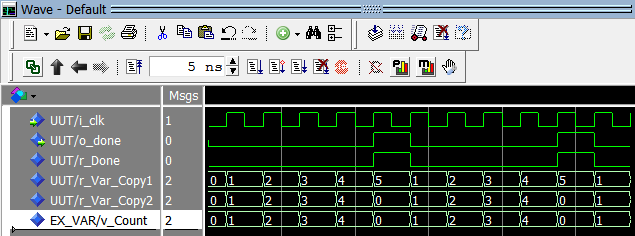
This example highlights the distinct behaviors of variables versus signals: while r_Var_Copy1 reaches 5, r_Var_Copy2 never does because the variable is reset before the signal assignment.
VHDL
- VHDL Procedure Example: Incrementing a Standard Logic Vector
- Leveraging VHDL Records for Clean, Reusable FIFO Interfaces
- C Variables, Constants, and Literals: A Complete Guide
- Understanding C Storage Classes: Scope, Lifetime, and Performance
- Understanding the Difference Between Signals and Variables in VHDL
- Mastering C# Variables & Operators: Practical Examples & Explanations
- Java Variables and Data Types – A Comprehensive Guide with Examples
- Understanding Java Variable Types: A Comprehensive Guide
- Understanding Variables in C: Types, Naming Rules, and Memory Management
- Python Variable Types: Understanding and Using Data Types