Arduino-Based Social Distancing Reminder System for COVID-19
Components and supplies
Arduino UNO
Arduino Nano works better for this, but I have used an Arduino UNO.
×
1
Arduino Proto Shield
I used it, but it's optional.
×
1
Adafruit Mini Breadboard
×
1
Elegoo 16 x 2 LCD Display
×
1
Ultrasonic Sensor - HC-SR04 (Generic)
×
1
Touch sensor
You can also use a button, but you'll need a pull-down resistor.
×
1
NTC Thermistor
×
1
Resistor 10k ohm
×
1
Buzzer
×
1
Rotary potentiometer (generic)
This is to adjust the contrast of the LCD.
×
1
Jumper wires (generic)
×
1
A transparent box to put everything into
It needs to be transparent for you to be able to see the LCD and it needs to be waterproof to light rain
×
1
Apps and online services
Arduino IDE
About this project
What is it?
Reasonably, the most reliable approach to slowing down the spread of the coronavirus is to keep away from others; prevention is better than cure. However, it would be irritating to turn around every thirty seconds and look if someone was approaching you. It would be helpful if there were a device that could warn others to keep away from you. That is the purpose behind the project: to alert others to maintain a 2-meter distance from you. It is a 2-in-1 as the thermistor is not only used to add accuracy to the distance measurement (the speed of sound changes depending on the temperature) but it also means that – by using a button or a touch sensor to switch between the modes – it can have two modes: alerting if someone comes close to you (Mode 1) and measuring the temperature and the distance (Mode 2). The measuring mode shows the temperature and the distance on the LCD.
How does it work?
The Arduino measures the temperature.
The temperature is used to calculate the distance with greater accuracy.
If the Arduino is on Mode 1:
If the distance is between 2m and 1m, the LCD backlight lights up and the LCD shows "Please keep away" and how far away the person is.
If the distance is 1m - 50cm the backlight of the LCD flashes and the LCD shows "Keep away"
If the distance is less than 50cm the backlight turns off and on twice a second and the LCD shows "STAY AWAY!"
If the Arduino is on Mode 2, the LCD shows the distance on the top and the temperature on the bottom of the screen.
To protect the components from the rain, I attached half a plastic bottle which can be pushed up when there is rain.
It can be attached to (using two pieces of string) and be easily removed from the bottom of a rucksack.
The touch sensor is used to switch between the modes.
How do I build it?
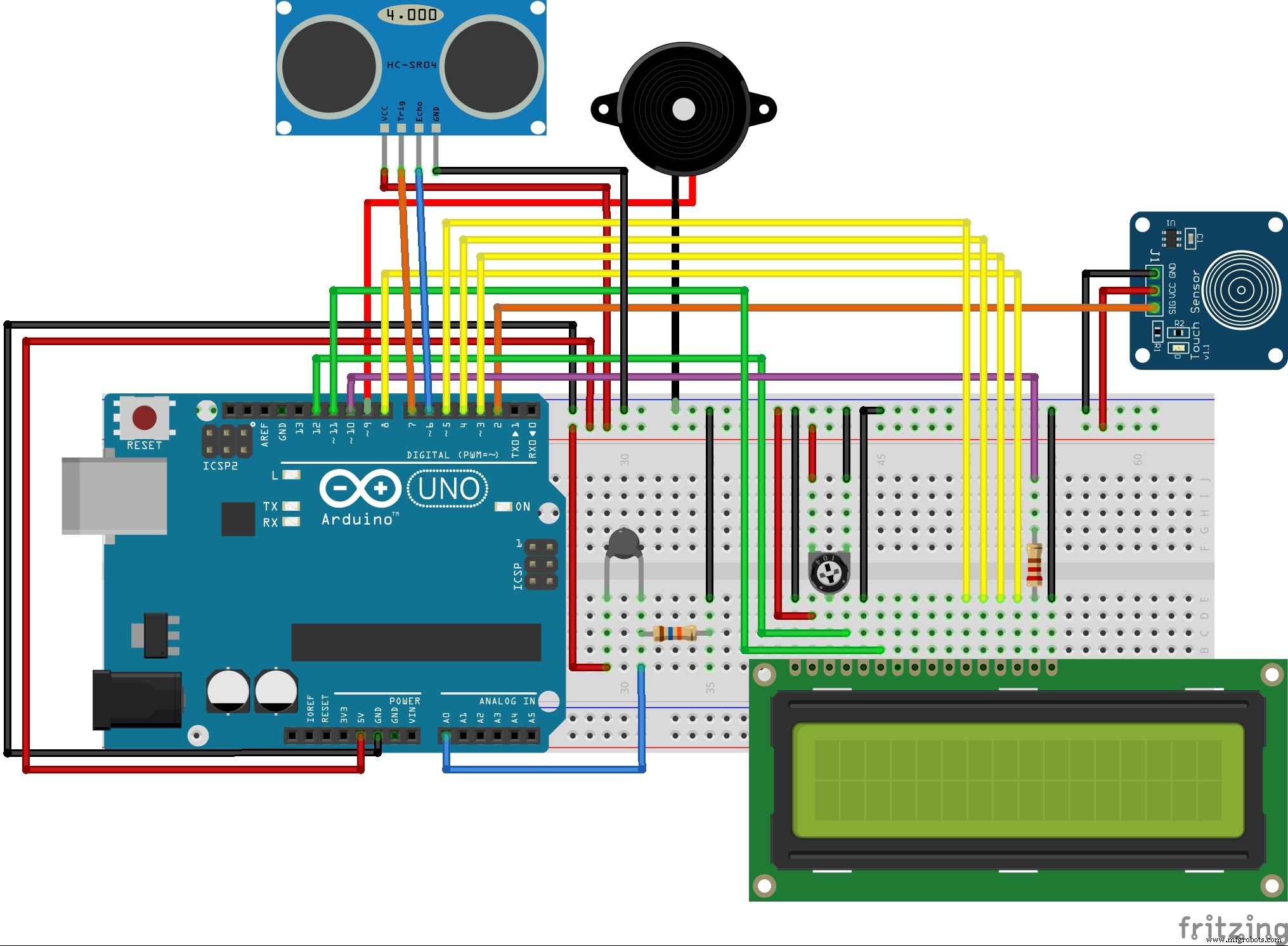
Connect the components according to the circuit diagram below.
Once you have done that, import the libraries under the section named 'Code' – which you can do by (assuming you have opened the Arduino IDE) going to 'Sketch' —> 'Include Library' —> 'Add .ZIP Library...' and selecting the library (which should be a .zip file). Both libraries are needed for the code to work.
When all that is done, you can upload the code below.