



Master C# Classes & Objects: A Practical Tutorial with Real‑World Examples
C# builds on the powerful object‑oriented foundation of C++. Its built‑in support for classes and objects lets developers model real‑world entities with clean, maintainable code.
Consider an application that manages employee records. An Employee class would store properties such as ID and Name, and expose methods to add or update those records.
In this guide, you’ll learn how to:
- Define what a class and an object are
- Create a class and instantiate objects in Visual Studio
- Work with fields, properties, and methods
What Is a Class and an Object?
A class is a blueprint that encapsulates data (fields or properties) and behavior (methods). An object is an instance of that blueprint, holding concrete values for the fields.
In a class:
- Fields or properties describe the data the class holds.
- Methods define the operations that can be performed on that data.
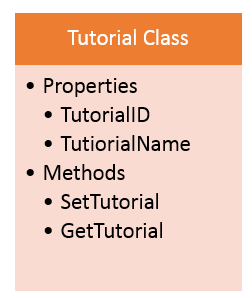
Let’s illustrate with a simple example. Suppose we have a Tutorial class that represents a learning module.
The class contains:
- TutorialID – a unique numeric identifier.
- TutorialName – the name of the tutorial as a string.
It also defines two methods:
- SetTutorial – assigns an ID and name to the instance.
- GetTutorial – retrieves the tutorial name.
Below is a visual representation of the class structure.
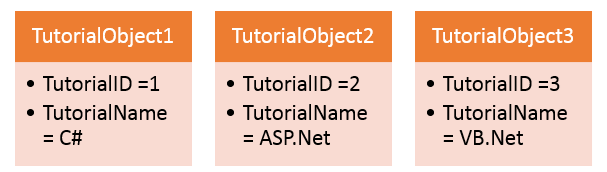
When we create objects of this class, each object holds its own values:
Creating a Class and an Object in Visual Studio
Open an existing console project or create a new one. Follow these steps to add the Tutorial class:
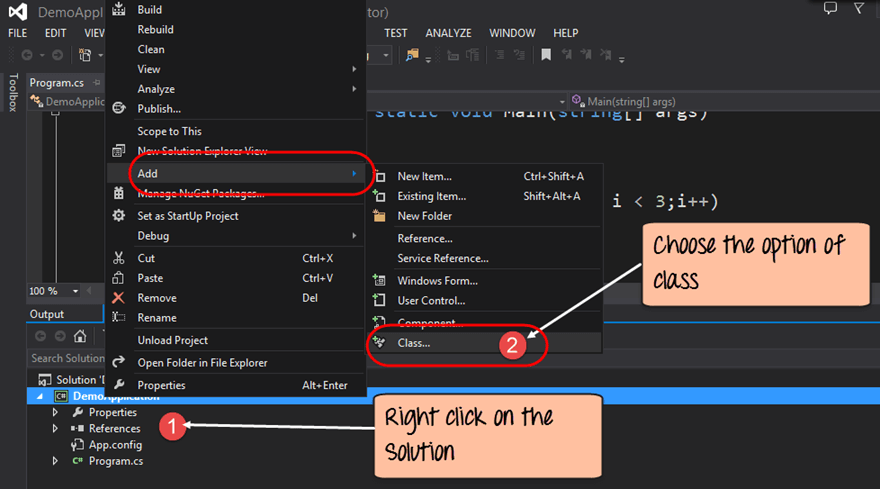
Step 1 – Add a New Class
Right‑click the project (e.g., DemoApplication) in Solution Explorer, choose Add → Class, and give it the name Tutorial.cs.
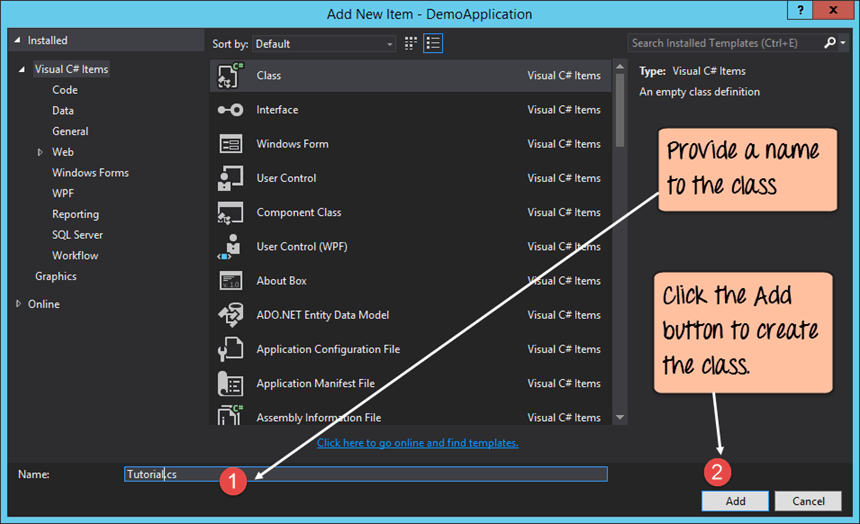
Step 2 – Name the Class
In the dialog, type Tutorial.cs and click Add. Visual Studio inserts a template file:
After adding, the file contains a basic class skeleton:
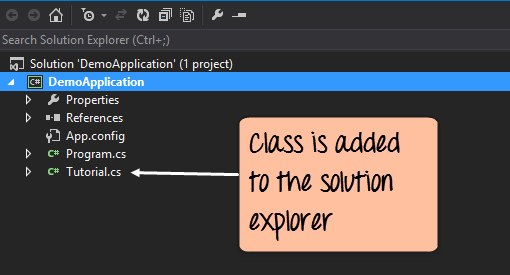
Open Tutorial.cs and replace the placeholder with the following implementation.
Defining Fields and Methods
Insert these members:
class Tutorial
{
    int TutorialID;
    string TutorialName;

    public void SetTutorial(int pID, string pName)
    {
        TutorialID = pID;
        TutorialName = pName;
    }

    public string GetTutorial()
    {
        return TutorialName;
    }

    static void Main(string[] args)
    {
        Tutorial pTutor = new Tutorial();
        pTutor.SetTutorial(1, ".Net");
        Console.WriteLine(pTutor.GetTutorial());
        Console.ReadKey();
    }
}
The SetTutorial method assigns the supplied parameters to the class fields, while GetTutorial returns the stored name. The Main method demonstrates creating an instance, initializing it, and displaying the result.
Running the program yields:
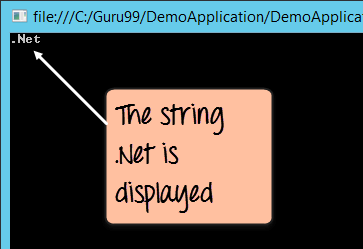
As you can see, the console prints .Net, confirming that the object’s state was correctly set and retrieved.
Key Takeaways
- A class groups related data and behavior.
- An object is an instantiated copy of that class with its own data.
- Fields hold state; methods perform actions.
C Language
- C# Classes & Objects: Foundations for Robust OOP
- C++ Classes & Objects: A Practical Guide with Code Examples
- Master C# Inheritance & Polymorphism: Practical Code Examples
- C# Abstract Classes: A Practical Tutorial with Code Examples
- Master C# Collections: A Practical Tutorial with Real-World Examples
- Mastering C# ArrayList: Comprehensive Tutorial with Practical Examples
- C# Hashtable Explained: Key-Value Storage, Operations, and Practical Examples
- Java OOP Concepts: Fundamentals, Examples, and Advantages
- Master Java Reflection API: A Practical Guide with Code Examples
- Understanding type() and isinstance() in Python: Practical Examples