



Java Stack Class – Comprehensive Guide to Usage and Methods
Java Stack Class
This tutorial explains Java’s Stack class, its core methods, and practical examples to help you master stack operations.
The Java collections framework includes a Stack class that implements the classic stack data structure. According to the official Java documentation, Stack extends Vector, inheriting all of its methods while adding stack‑specific operations.
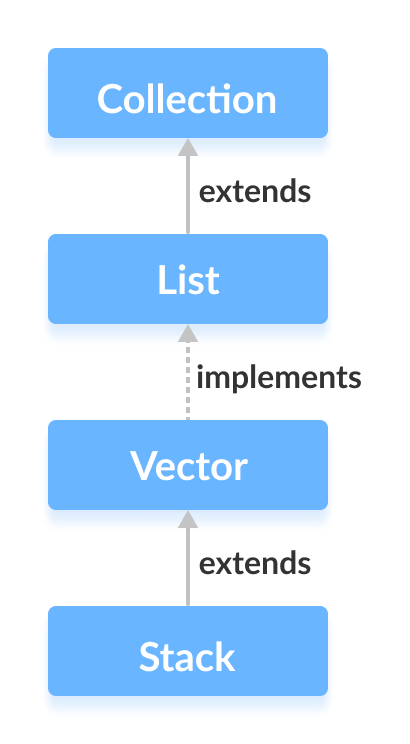
Stack Implementation
A stack follows the Last In, First Out (LIFO) principle: elements are pushed onto the top and popped from the top. The following diagram illustrates this behavior.
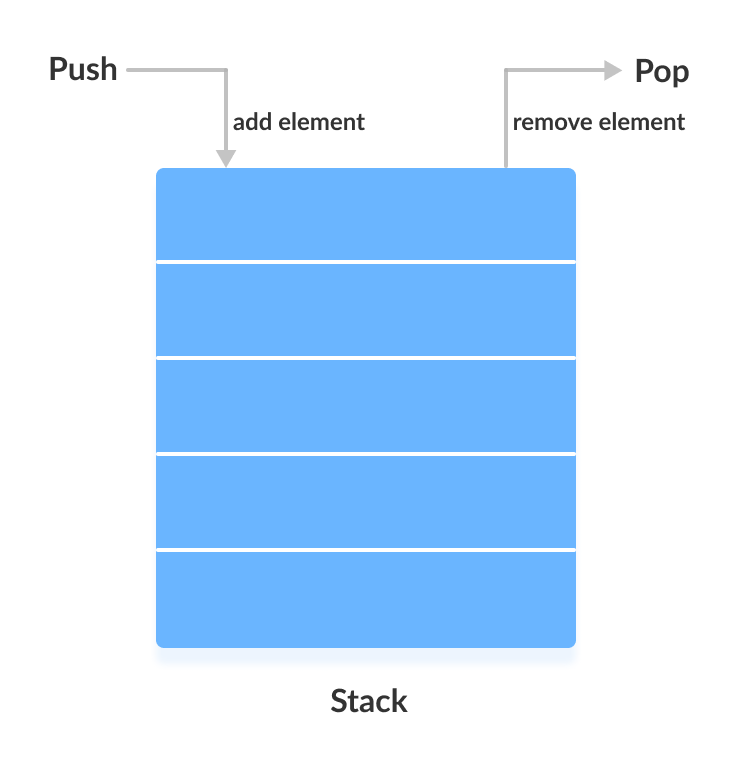
Creating a Stack
To create a stack, import java.util.Stack and instantiate it with the desired generic type:
Stack<Type> stack = new Stack<>();
Examples:
// Integer stack
Stack<Integer> intStack = new Stack<>();

// String stack
Stack<String> stringStack = new Stack<>();
Stack Methods
Beyond the inherited Vector methods, Stack provides five dedicated operations that distinguish it from generic collections. For a full list of Vector methods, refer to the Vector class documentation.
push() Method
The push() method adds an element to the top of the stack.
import java.util.Stack;

class Main {
    public static void main(String[] args) {
        Stack<String> animals = new Stack<>();
        animals.push("Dog");
        animals.push("Horse");
        animals.push("Cat");
        System.out.println("Stack: " + animals);
    }
}
Output
Stack: [Dog, Horse, Cat]
pop() Method
The pop() method removes and returns the element at the top of the stack.
import java.util.Stack;

class Main {
    public static void main(String[] args) {
        Stack<String> animals = new Stack<>();
        animals.push("Dog");
        animals.push("Horse");
        animals.push("Cat");
        System.out.println("Initial Stack: " + animals);
        String removed = animals.pop();
        System.out.println("Removed Element: " + removed);
    }
}
Output
Initial Stack: [Dog, Horse, Cat]
Removed Element: Cat
peek() Method
The peek() method retrieves the top element without removing it.
import java.util.Stack;

class Main {
    public static void main(String[] args) {
        Stack<String> animals = new Stack<>();
        animals.push("Dog");
        animals.push("Horse");
        animals.push("Cat");
        System.out.println("Stack: " + animals);
        String top = animals.peek();
        System.out.println("Element at top: " + top);
    }
}
Output
Stack: [Dog, Horse, Cat]
Element at top: Cat
search() Method
The search() method returns the 1‑based position of an element from the top of the stack, or -1 if it’s not present.
import java.util.Stack;

class Main {
    public static void main(String[] args) {
        Stack<String> animals = new Stack<>();
        animals.push("Dog");
        animals.push("Horse");
        animals.push("Cat");
        System.out.println("Stack: " + animals);
        int pos = animals.search("Horse");
        System.out.println("Position of Horse: " + pos);
    }
}
Output
Stack: [Dog, Horse, Cat]
Position of Horse: 2
empty() Method
The empty() method checks whether the stack has any elements.
import java.util.Stack;

class Main {
    public static void main(String[] args) {
        Stack<String> animals = new Stack<>();
        animals.push("Dog");
        animals.push("Horse");
        animals.push("Cat");
        System.out.println("Stack: " + animals);
        boolean isEmpty = animals.empty();
        System.out.println("Is the stack empty? " + isEmpty);
    }
}
Output
Stack: [Dog, Horse, Cat]
Is the stack empty? false
Use ArrayDeque Instead of Stack
While Stack implements a stack, it is considered legacy. Modern Java code prefers ArrayDeque (implementing the Deque interface) for stack functionality because it offers better performance and clearer semantics. For more details, see:
Java
- Understanding Java’s final Keyword: Variables, Methods, and Classes
- Java instanceof Operator: A Comprehensive Guide
- Mastering Java Inheritance: Concepts, Types, and Practical Examples
- Mastering Java Anonymous Inner Classes: Definition, Syntax, and Practical Examples
- Mastering Java’s ObjectInputStream: A Comprehensive Guide
- Mastering Java ObjectOutputStream: Serialization, Methods, and Practical Examples
- Mastering Java’s PrintStream Class: Print, Println, and Printf Explained
- Mastering Java Reader Class: Subclasses, Methods, and Practical Example
- Mastering Java Generics – Building Reusable, Type‑Safe Code
- Mastering Java File Operations with java.io – Creation, Reading, Writing & Deletion