


Industrial manufacturing
CNC Machine
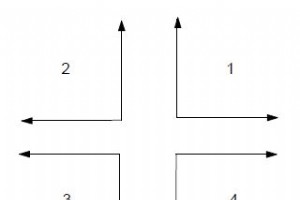
Osai UGS (UCG) – Use Graphic Scale (Machine plot)Osai 10 Series UGS command initialises the graphic display and establishes the limits and the orientation of the graphic display.Programming(UGS [,ax-orient],abs-axis,val1,val2,ord-axis,val3,val4 [,third-axis])ParametersParameterDescriptionax-or

Osai CGS (CLG) CommandOsai CGS command clears the profile from the screen leaving the system of coordinates.Programming(CGS)
Osai DGS (DCG) CommandOsai DGS command disables the graphic display, deletes the displayed profile, and removes the system of coordinates from the screen. After using the DGS command you need to use another UGS command to reinitialise the graphic display.Programming(DGS)
Osai DIS CommandOsai DIS command allows values to be displayed to the operator. The control will show the value in the screen area that is reserved for communications with the operator.Programming(DIS,operand [,operand ] [,operand] [,operand] [,operand ])ParametersParameterDescriptionoperandIt can b
Comments in Anilam ProgramsIn Anilam CNC programmer can use an asterisk (*) to make comments within a Program Listing or to mask all or part of a block from the CNC.When an asterisk is placed before a string of text, the CNC ignores all the text to the right.Program ExamplesExample 1*N20 G1 X5 Z6N30
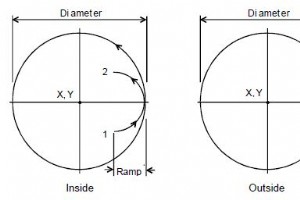
G171 Circular Profile CycleAnilam G171 Circular Profile Cycle cleans up the inside or outside profile of an existing circle.ProgrammingG171 Xn Yn Hn Dn Zn An Rn Bn Sn In Jn Kn PnParametersParameterDescriptionXX coordinate of the center. Default: present position. Optional.YY coordinate of the center
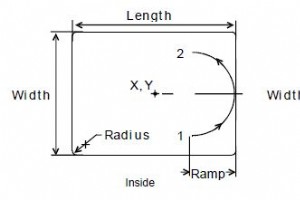
Anilam G172 Rectangular Profile CycleAnilam G172 Rectangular Profile Cycle cleans up the inside or outside profile of a rectangle.ProgrammingG172 Xn Yn Hn Mn Wn Zn An Rn Un Bn Sn In Jn Kn PnParametersParameterDescriptionXX coordinate of the center. If no coordinate is entered, the CNC centers the po
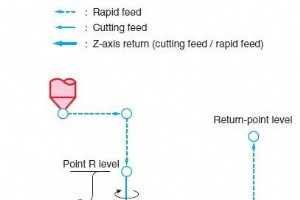
Okuma G73 High Speed Deep Hole Drilling CycleG73 High Speed Deep Hole Drilling CycleProgrammingG73 X__Y__Z__R__P__Q__F__ParametersParameterDescriptionX,YCoordinate values of hole positionZHole bottom levelIn G90 mode:Position in the selected coordinate systemIn G91 mode:Distance from the point R lev
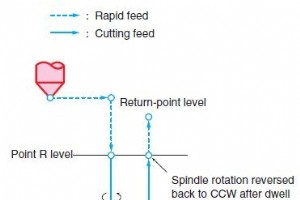
Okuma G74 Reverse Tapping CycleG74 Reverse Tapping CycleProgrammingG74 X__Y__Z__R__P__Q__F__ParametersParameterDescriptionX,YCoordinate values of hole positionZHole bottom levelIn G90 mode:Position in the selected coordinate systemIn G91 mode:Distance from the point R levelRPoint R levelPDwell time
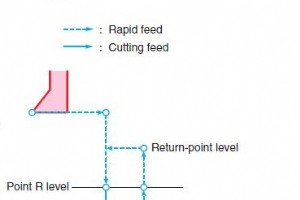
Okuma G76 Fine Boring CycleG76 Fine Boring CycleProgrammingG76 X__Y__Z__R__Q__(I__J__) P__F__ParametersParameterDescriptionX,YCoordinate values of hole positionZHole bottom levelRPoint R levelQShift amount (See the explanation below.)I,JShift amount (See the explanation below.)PDwell time at hole bo
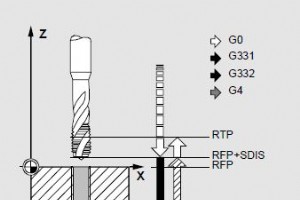
Sinumerik CYCLE84 Rigid Tapping CycleCYCLE84 produces tapped holes without using a floating tapholder.CYCLE84 can be applied only if the spindle designated for drilling is capable of working in the position-controlled spindle mode.ProgrammingCYCLE84(RTP, RFP, SDIS, DP, DPR, DTB, SDAC, MPIT,PIT, POSS
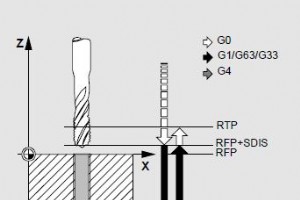
Sinumerik CYCLE840 Tapping with Floating TapholderWith Sinumerik CYCLE840 cycle, tapped holes can be produced with floating tapholderwithout encoderwith encoder.For tapping without floating tapholder (rigid taping) CYCLE84 is used.ProgrammingCYCLE840 (RTP, RFP, SDIS, DP, DPR, DTB, SDR, SDAC, ENC, MP
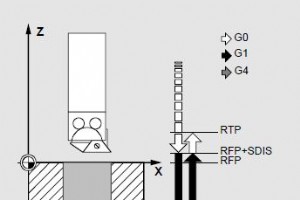
Sinumerik CYCLE85 Bore 1In the CYCLE85 “Bore 1” cycle, the inward and outward motions are performed at a feedrate that must be specified under the relevant parameters.ProgrammingCYCLE85 (RTP, RFP, SDIS, DP, DPR, DTB, FFR, RFF)ParametersParameterDescriptionRTPReturn plane (absolute)RFPRef
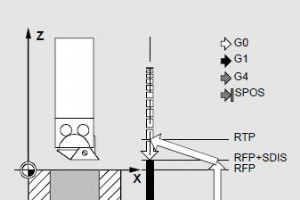
Sinumerik CYCLE86 Bore 2In the CYCLE86 “Bore 2” cycle, an oriented spindle stop is performed on reaching the drilling depth. The tool then travels at rapid traverse to the programmed return positions and from there to the return plane.CYCLE86 cycle can only be used if the spindle designa
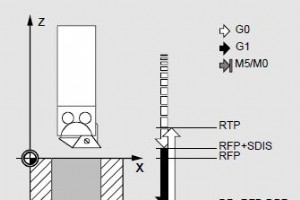
Sinumerik CYCLE87 Bore 3In Sinumerik CYCLE87 “Bore 3” cycle, a spindle stop without orientation is effected on reaching the final drilling depth, followed by a programmed stop. By pressing the NC Start key, the upwards movement is continued at rapid traverse until the retraction plane is
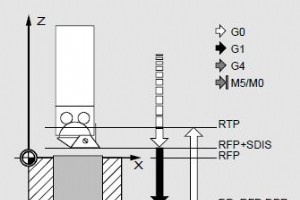
Sinumerik CYCLE88 Bore 4In Sinumerik CYCLE88 “Bore 4” cycle, a dwell time is effected on reaching the final drilling depth together with a spindle stop without orientation and a programmed stop. By pressing the NC Start key, the upwards movement is performed at rapid traverse until the r
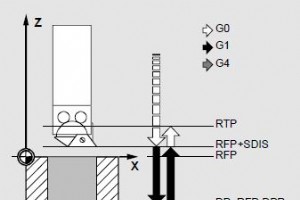
Sinumerik CYCLE89 Bore 5In Sinumerik CYCLE89 “Bore 5” cycle, the inwards and the upwards movements are performed at the F value programmed before the cycle call. On reaching the final drilling depth, a dwell time can be effected.ProgrammingCYCLE89 (RTP, RFP, SDIS, DP, DPR, DTB)Parameters
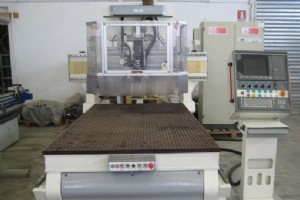
Osai GTL (HIGH LEVEL GEOMETRIC PROGRAMMING)Osai 10 Series CNC systems permit to program a geometric profile on the plane using either the standard programming language (G1-G2-G3) or GTL, a high level programming language.Osai GTL makes it possible to use the information provided by the drawing in or
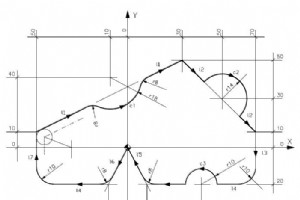
Osai 10 Series Programming example using Osai GTL (high level programming language).Osai GTL Programming ExampleN1 (DIS,EXAMPLE GTL)N2 l1=X-50Y10,X30Y50N3 l2=X30Y50,X70Y10N4 l3=X70Y0,a-90N5 l4=X=Y-20,a180N6 l5=X10Y-20,X0Y0N7 l6=X0Y0,X-10Y-20N8 l7=X-50Y0,a90N9 c1=I-10J40r18N10 c2=I50J30r-14N11 c3=I40
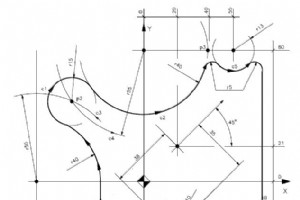
Osai 10 Series allows the programmers to make cnc programs using standard programming language (G1-G2-G3) or GTL, a high level programming language (GTL).Here is a complete Osai GTL programming example.Osai CNC GTL Program ExampleN1 (DIS,EXAMPLE 3)N2 S...F...T1.1M6 M...N3 o1=X20 Y21 a45N4 l1=X0 Y-60
CNC Machine

Understanding Supply Chain Management: Key Concepts & Benefits
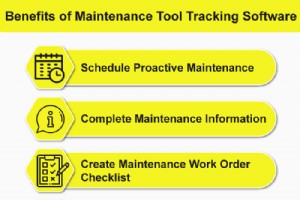
Top Benefits of Maintenance Tracking Software for Asset Management
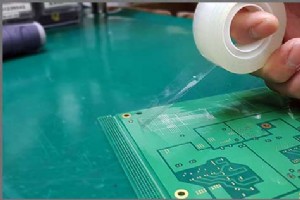
8 Key Steps for Precise Rigid‑Flex PCB Production
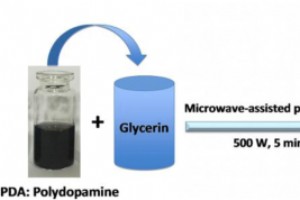
5‑Minute Microwave‑Assisted Synthesis of Polydopamine‑Passivated Carbon Dots with 5 % Quantum Yield and 35 % Photothermal Efficiency for Cancer Therapy

