



Mastering Java StringReader: How to Read Characters from Strings
Java StringReader Class
In this tutorial, we will learn about Java StringReader and its methods with the help of examples.
The StringReader class of the java.io package can be used to read data (in characters) from strings.
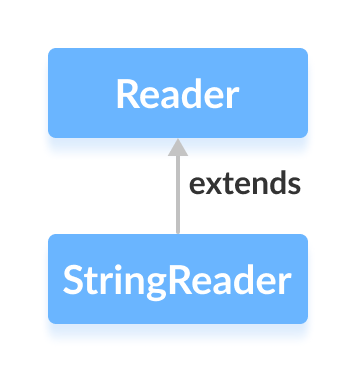
It extends the abstract class Reader.
Note: In StringReader, the specified string acts as a source from where characters are read individually.
Create a StringReader
In order to create a StringReader, we must import the java.io.StringReader package first. Once we import the package here is how we can create the string reader.
// Creates a StringReader
StringReader input = new StringReader(String data);
Here, we have created a StringReader that reads characters from the specified string named data.
Methods of StringReader
The StringReader class provides implementations for different methods present in the Reader class.
read() Method
read()- reads a single character from the string readerread(char[] array)- reads the characters from the reader and stores in the specified arrayread(char[] array, int start, int length)- reads the number of characters equal to length from the reader and stores in the specified array starting from the position start
Example: Java StringReader
import java.io.StringReader;

public class Main {
  public static void main(String[] args) {

    String data = "This is the text read from StringReader.";

    // Create a character array
    char[] array = new char[100];

    try {
      // Create a StringReader
      StringReader input = new StringReader(data);

      //Use the read method
      input.read(array);
      System.out.println("Data read from the string:");
      System.out.println(array);

      input.close();
    }
    catch(Exception e) {
      e.getStackTrace();
    }
  }
}
Output
Data read from the string:
This is the text read from StringReader.
In the above example, we have created a string reader named input. The string reader is linked to the string data.
String data = "This is a text in the string.";
StringReader input = new StringReader(data);
To read data from the string, we have used the read() method.
Here, the method reads an array of characters from the reader and stores in the specified array.
skip() Method
To discard and skip the specified number of characters, we can use the skip() method. For example,
import java.io.StringReader;

public class Main {
  public static void main(String[] args) {

    String data = "This is the text read from StringReader";
    System.out.println("Original data: " + data);

    // Create a character array
    char[] array = new char[100];

    try {
      // Create a StringReader
      StringReader input = new StringReader(data);

      // Use the skip() method
      input.skip(5);

      //Use the read method
      input.read(array);
      System.out.println("Data after skipping 5 characters:");
      System.out.println(array);

      input.close();
    }

    catch(Exception e) {
      e.getStackTrace();
    }
  }
}
Output
Original data: This is the text read from the StringReader
Data after skipping 5 characters:
is the text read from the StringReader
In the above example, we have used the skip() method to skip 5 characters from the string reader. Hence, the characters 'T', 'h', 'i', 's' and ' ' are skipped from the original string reader.
close() Method
To close the string reader, we can use the close() method. Once the close() method is called, we cannot use the reader to read data from the string.
Other Methods of StringReader
| Method | Description |
|---|---|
ready() |
checks if the string reader is ready to be read |
mark() |
marks the position in reader up to which data has been read |
reset() |
returns the control to the point in the reader where the mark was set |
To learn more, visit Java StringReader (official Java documentation).
Java
- Understanding Java’s final Keyword: Variables, Methods, and Classes
- Java instanceof Operator: A Comprehensive Guide
- Mastering Java Anonymous Inner Classes: Definition, Syntax, and Practical Examples
- Mastering Java’s ObjectInputStream: A Comprehensive Guide
- Mastering Java ObjectOutputStream: Serialization, Methods, and Practical Examples
- Mastering Java’s PrintStream Class: Print, Println, and Printf Explained
- Mastering Java Reader Class: Subclasses, Methods, and Practical Example
- Mastering Java StringReader: How to Read Characters from Strings
- Mastering Java Generics – Building Reusable, Type‑Safe Code
- Mastering Java File Operations with java.io – Creation, Reading, Writing & Deletion